EmilyDates dating site: registration, features and costs
City and age filters, dating goals in your profile and options to promote your profile are the main EmilyDates (Emily Dates) features shown in this review’s screenshots. Two questions matter when choosing a service: can you find suitable people, and what are the messaging terms? Below, we cover registration, access to an existing account, the differences between paid features, and a comparison with Mamba and Tabor.
Registering on EmilyDates and completing your profile
The profile form includes a choice of dating goals. Specify what interests you: chatting, spending time together or a relationship. Only add information to your public profile that you are comfortable sharing with other members.

Instead of a general phrase such as “looking to chat”, describe your interests: walks around the city or travelling together, for example. This gives someone a clearer starting point for a conversation.
EmilyDates login and account recovery
To sign in to an existing EmilyDates account, use the login method you chose when creating your profile. Check the website address before entering your password. Dating-Online.net does not provide an EmilyDates login form; the sign-up button in this review does not recover an old account.
- Check your saved login address, the email linked to your profile and the login method you selected.
- If the login form offers password recovery, request an email and check your Spam and Promotions folders.
- When contacting support, include your profile URL and the error message. Never share your password or one-time codes.
Do not purchase a new paid service to recover access. If your question concerns a subscription you have already paid for, find your receipt: it can help you identify the payment recipient and the relevant contact details.
Finding profiles and chatting on EmilyDates
How to assess the profile search
The EmilyDates screenshot shows city and age filters, plus tabs labelled “All”, “New” and “Online”. These serve different purposes: filters narrow the profiles shown, while the tabs change how you browse them.
If you want to meet someone in your city, start with location and a suitable age range. Then check whether your dating goals match. The profile form shown includes separate options for travelling together, spending an evening together and relationships.
During a conversation, ask what the other person is looking for and whether they are open to meeting. Matching locations and profile goals can help you start a conversation, but they cannot replace one.

Credits represent an internal balance, premium is a separate profile status, and TOP placement and the photo feed offer additional visibility. The interface also shows an incognito mode. These labels refer to different features; the purchase terms should explain what a paid package includes.
Messaging and profile promotion serve different purposes
EmilyDates on mobile
The mobile EmilyDates screenshot shows profiles in a vertical layout. When choosing photos on your phone, check the browser’s permission to access your photo library.
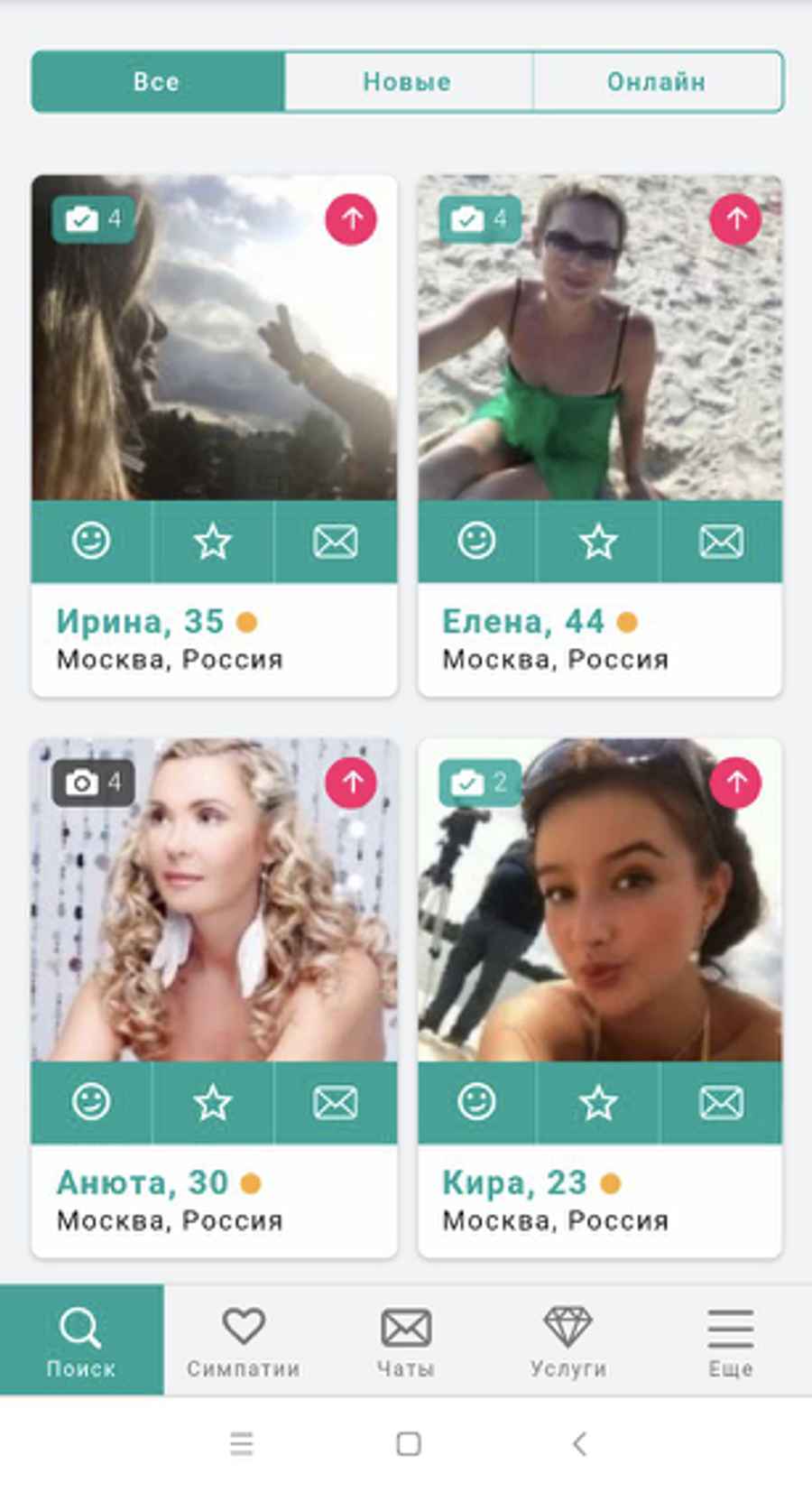
If other people use your device, turn off message previews on the lock screen. This is a phone privacy setting and does not replace your profile visibility settings.
Privacy and safer conversations
Pay attention to the other person’s behaviour. Requests to pay for travel or medical treatment, send money urgently or invest in a scheme are reasons to stop the conversation and assess the situation.

- Do not send money to someone you have not met in person, or pay for “tickets” or “identity checks” they send you.
- Try a reverse image search on their photo: a different name or conflicting details are reasons to ask questions.
- If you notice signs of deception, stop chatting, save the messages and use any available reporting or blocking tools.
- If you have already sent money, contact your bank or payment provider immediately.
These recommendations draw on the FTC’s guidance on romance scams. A secure connection does not establish that the person you are talking to is honest.
EmilyDates costs and credits
The interface shows a credit balance and an offer of premium status. Current EmilyDates prices have not been established for this review: the screenshots do not show the price of a message or what a package includes.
Before buying, compare these four terms:
- Messages: whether sending and reading are included in the available package or charged separately.
- Premium: which features the status includes and which extras still cost money.
- Credits: how much the action you need costs and whether unused credits expire.
- Duration: whether this is a one-off purchase or a service with recurring charges.
Subscriptions, automatic renewal and deleting your profile
Keep the receipt and purchase terms: you will need the payment recipient, service duration and cancellation procedure. If you purchased a subscription through an app store, manage it in that store’s subscriptions section.
To cancel a paid service, follow the procedure provided at purchase and keep the cancellation confirmation. Logging out or uninstalling an app does not confirm that renewal has been turned off. If you have lost access to your profile, start with the contact details on your payment receipt.
Hiding a profile, deactivating it and deleting data may have different consequences. Choose according to the description in your account, and cancel any paid subscription separately. The current sequence of buttons for deleting an EmilyDates profile has not been verified in this review.
EmilyDates and alternatives: what to compare
Messaging access, search settings and paid extras are useful comparison points. The EmilyDates features below are described from the screenshots; the Mamba and Tabor information comes from the official pages linked in the sources section.
What to consider when choosing EmilyDates
This format may suit you if you prefer to choose profiles yourself by city, age and dating goals. If free messaging is your main requirement, establish the messaging terms first: registration alone does not answer that question. For comparison, Tabor explicitly advertises free messaging, while Mamba puts additional filters and visibility settings in its VIP offering.
EmilyDates questions and answers
What if I cannot log in or the recovery email does not arrive?
Check the email address for typos and look in your Spam and Promotions folders. If the login form offers password recovery, request an email for the address linked to your profile. Do not buy a new subscription to recover an old account. When contacting support, have your profile URL and error message ready; never share your password or verification codes.
Can I message people for free after registering?
Free registration alone does not establish the messaging terms. Before paying to chat, check sending messages, reading replies and restrictions on new contacts separately. The terms may depend on the service you choose. The current price of a message has not been established in this review.
How do credits, premium and profile promotion differ?
The EmilyDates screenshots show a credit balance, premium status, TOP placement and a photo feed. Before paying, check what each service includes: buying credits does not by itself explain which actions use the balance, and profile promotion does not guarantee replies. Check the service duration and whether it renews automatically.
Does incognito hide my name, age and city?
Do not assume specific information is hidden just because a feature is called “Incognito”. Before enabling it, read the description: does it hide profile visits, online status or the profile itself? The option’s presence in a screenshot does not establish that it hides your name, age and city.
How do I cancel a subscription and check automatic renewal?
Check your paid services section and purchase terms. If automatic renewal applies, turn it off using the procedure stated in the terms and keep the confirmation. If you purchased through an app store, check its subscriptions section. Uninstalling the app and logging out do not confirm cancellation. If you cannot access your account, use the contact details on your payment receipt.
How do I delete my EmilyDates profile?
If you can access your account, check the profile settings and deletion terms. Establish whether the option temporarily hides the profile, deactivates it or permanently deletes data. Check any active paid services separately and obtain confirmation of cancellation. If you cannot log in, use support contact details from previous emails or your receipt. The current sequence of deletion buttons has not been verified in this review.
What should I do if someone asks for money or sends a payment link?
Stop the conversation if someone you do not know asks for money for travel or medical treatment, or suggests investments. Do not enter payment details through a link they send you. Save the conversation and report it using the service’s available tools. If you have already sent money, contact your bank or payment provider immediately.
You can find more reviews in our dating sites section.