How to fill out a dating profile
Start with a recent photo, a couple of specific details about yourself and an honest line about what you’re looking for. Your profile should show what you look like, what you enjoy and what someone could ask you about. Before saving, check your text and photos for personal information.
What to add to your profile
Put each detail in the relevant profile field. Use “About me” to make it easier to start a conversation: mention something you enjoy, share a small detail from your life or ask a question.
The available fields depend on the platform. For example, the Tinder guide to editing your profile lists separate options for photos, your bio, interests and relationship goals. Tinder says the available settings may vary by region.
Photos
Choose a portrait that shows your face clearly as your first photo. Check how the picture is cropped in the profile card. If several people appear in a photo, use it as an extra shot and ask them before posting it.
Use the other pictures to show different parts of your life: walking your dog, baking bread or cycling, for example. Pick photos that look like you today. Zoom in before uploading and check the background for readable work badges, documents or house numbers.
The “About me” section
Pick one detail people can picture and one topic they could use to open a conversation. If there’s a relationship goals field, fill it out separately. Use the examples below as templates and swap in your own interests and intentions.
Read your bio out loud. If it sounds like someone else’s profile, replace the line with a detail you could share when you meet. Instead of listing requirements, you could describe how you like getting to know people: “I like chatting for a bit. If the conversation flows, I’ll suggest meeting for coffee.”
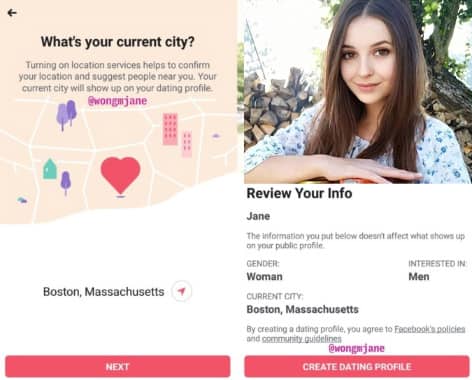
Profile privacy
Only share details in your public profile that you’re comfortable giving to strangers. If you mention where you live, stick to your city. Keep your home address, exact workplace and regular travel schedule out of the text and photos.
Check who can see your profile and photos, and whether you can limit their visibility. Use the platform’s chat when you first start talking and share contact details when you’re ready. You’ll find more examples of information to keep private in Tinder’s safety tips.
Checklist before saving
- Open the profile preview, if available, and check how your main photo is cropped.
- Check that you’ve described your relationship goal the way you would in conversation.
- Include at least one specific detail that someone could ask you about.
- Remove contact details, your exact address and information about your daily routine. Check the visibility settings.
Once your profile is ready, see how the platforms differ in our comparison of five dating sites. If you prefer a messaging app, our Telegram dating bot review describes another way to get started.
Frequently asked questions
What should I write about myself in my dating profile?
Name one or two things you genuinely enjoy and include a detail that someone could ask about. For example: “I make pasta on Sundays. What do you like to cook when you have time?”
Which photo should I put first?
Choose a recent solo photo that clearly shows your face. Check the crop in the profile preview and make sure the background doesn’t reveal personal information.
Should I say I’m looking for a serious relationship?
If that’s your goal, say so in the relevant field or in your bio. A short line is enough: “I’d like to meet someone for a serious relationship.”
What should I leave out of a public dating profile?
Keep your phone number, home address, exact work address and regular travel schedule private. Check that your photos don’t reveal any of those details.
Prepared by Dating-Online.net